Medeek Wall Plugin
A project in Copalis Beach, WA by Nathaniel Wilkerson000days
:
00hours
:
00minutes
Funding Successful

The Medeek Wall Plugin is a SketchUp Plugin that provides a simple interface for creating 3D wall geometry within SketchUp.
Backers: 41
Average Pledge Per Backer: $80
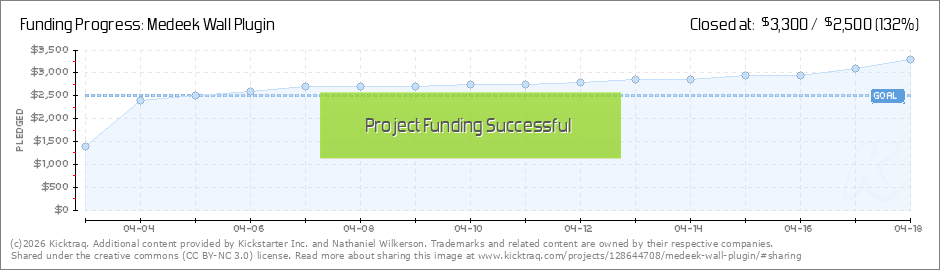
Funded: $3,300 of $2,500
Dates: Apr 3rd -> Apr 18th (15 days)
Project By: Nathaniel Wilkerson
Backers: 41
Average Pledge Per Backer: $80
Funded: $3,300 of $2,500
Dates: Apr 3rd -> Apr 18th (15 days)
Project By: Nathaniel Wilkerson
$3,300
current pledge level
Last Updated: April 18 @ 14:04 -0400 GMT
132%
of goal

(loading your very own snazzy kicktraq chart)
(loading your very own snazzy kicktraq chart)
(loading your very own snazzy kicktraq chart)
(loading your very own snazzy kicktraq chart)
(loading your very own snazzy kicktraq chart)
Now you can share!
Help your backers reach your daily goals and help others see how you're doing. It's easy, with Kicktraq Mini.Here are a few quick snippits of code you can use to embed your personalized widget on your website, in your blog, and even on your favorite forum.
HTML for websites & blogs
Copy HTMLBBCode for forums
Copy BBCodeReddit code for... well, Reddit
Copy Reddit CodeSpecial Note: Kickstarter recently disabled remote embedding for images on project pages, so embedding code doesn't work on project pages (yet) - just everywhere else.
You can read more about it here.
Latest News
Interior and Exterior Trim 
April 17th - via: kickstarter.com
I am still working on the basic functions of the plugin (ie. framed openings and their modifications) however I've had a number of questions and requests regarding trim around windows and doors. My initial idea is to have a two tabs within the global... (Read More)
Second Toolbar
April 16th - via: kickstarter.com
After reviewing a suggestion by Steven Dorst (Sjdorst) and giving it some more thought I've decided the additional tools of the second toolbar can be consolidated. There will be an icon to add a new window or door but the icon(s) to move, edit or... (Read More)
Additional thoughts on Workflow
April 16th - via: kickstarter.com
I like the whole idea of the model changing hands from the designer to the engineer and then finally to the contractor or builder. Initially the designer would use first the 2D mode to work on overall space layout and then bring it up into the... (Read More)
Wall Plugin Preview
April 15th - via: kickstarter.com
I'm still recovering from a cold/flu bug so I apologize for my coughing during the video: (Read More)
Wall Framing => Turned Off
April 13th - via: kickstarter.com
Since the model can get quite heavy with all of the studs, blocking, insulation and other geometry I've decided to add one additional option to the basic parameters called "Wall Framing". By turning this option to "NO" the walls are drawn with all of... (Read More)
Staggered Blocking
April 13th - via: kickstarter.com
The global settings will have two parameters: Blocking Height: Center or some numeric value Stagger Blocking: Yes / No Once you create the walls you can also change these two parameters up for each wall panel: See model here: ... (Read More)
Wall Cavity Insulation
April 13th - via: kickstarter.com
The cavity insulation option in the advanced options will fill in the wall cavities with insulation: This feature will only get more interesting as windows and doors are added. I supposed there will be some utility to this option for some since it... (Read More)
Mid Span Blocking (Fire-Blocking)
April 13th - via: kickstarter.com
I've added mid-span blocking into the advanced options: View model here: https://3dwarehouse.sketchup.com/model/d31237b7-407c-4b34-8e9a-56842015cf31/Framing-Test-3 This option will probably need additional parameters (mid-span, 8' on center,... (Read More)
Wall Edit Menu
April 12th - via: kickstarter.com
The wall edit feature is now functional and seems to be fairly robust. The wall edit menu shown below: Originally I was going to have all the windows and doors load up within this same menu but given how big it has grown already I think a... (Read More)
Test of Wall Framing with Cladding, Sheathing and Gypsum
April 10th - via: kickstarter.com
PT bottom plate option added into the first menu. The little structure above is not much to look at (no windows or doors yet) but it is the first time I've been able to create an entire building envelope with absolutely no manual editing of the... (Read More)
Wall Sheathing and Cladding
April 10th - via: kickstarter.com
Working on the advanced options this morning, I've added in sheathing, cladding and gypsum: As windows and doors are added to the wall they will automatically cut holes into the framing and these three other building layers. The code to cut holes... (Read More)
First Test of Wall Framing
April 9th - via: kickstarter.com
I am now testing the stud placement and top and bottom plates: So far only the line tool is available but seems to work fairly robustly now. Please download and comment on the model below:... (Read More)
Wall Corners Tab (Preview)
April 8th - via: kickstarter.com
Within this tab the user can set the defaults for the wall corners. These same settings can also be set for each wall segment with the "edit wall" tool. (Read More)
Wall Corners Tab - Global Settings
April 8th - via: kickstarter.com
Within the global settings and also when you edit a wall you will be able to modify the corner treatment at the start and end of each wall segment, the parameters being: Corner Stud Qty: 1,2,3,4 Corner Stud Thk. (in.): 1.5 (default), can be user... (Read More)
Rectangular Wall Menu #1
April 7th - via: kickstarter.com
The first menu for the rectangular wall tool, metric version is also complete (not shown): I've modifed the wall type parameter to include the following (3) options: Int-Int Int-Ext Ext-Ext I am still thinking about how best to... (Read More)
Layers Tab in the Global Settings
April 6th - via: kickstarter.com
Global settings:: Layer Tab: I am making solid progress on the Wall Plugin. All of the framework is now in place and the backend progamming (shopping cart, database, icons, images etc...) is now also complete. My ETA for the plugin is mid June... (Read More)
Layers
April 5th - via: kickstarter.com
The default layers for the plugin will be the following: **WALL LAYERS:** wall_frame wall_sheath wall_clad wall_trim wall_gypsum wall_insul **MISC LAYERS** wall_hardware (straps and holdowns) If one want more granular... (Read More)
Amazing
April 5th - via: kickstarter.com
Two days into the campaign and we are already there, I am still trying to understand why this campaign has had such a definitive response in contrast to the two previous Kickstarters, amazing. Yesterday I spent the vast majority of my time putting... (Read More)
FAQs
April 4th - via: kickstarter.com
I've recently had a number of questions about the plugin that are general enough that I thought they should be posted here on Kickstarter. Hopefully the questions and answers I've added to the FAQ will help clarify some of the details of this new... (Read More)
Overwhelming Response
April 4th - via: kickstarter.com
Within minutes of launching the project and notifying the Medeek client base of the campaign I have had an overwhelming response. Thank-you for vote of confidence and support. Today I am working on Menu #1 and Menu #2 of the plugin. The... (Read More)
If you have additional news that doesn't appear here, shoot us a link!