VoiceSee Handsfree and Eyesfree Web Navigation
A project in Burlington, VT by YiZRi Innovations000days
:
00hours
:
00minutes
Funding Unsuccessful
Talk & Listen Back to Your Favorite Websites
Backers: 50
Average Pledge Per Backer: $57
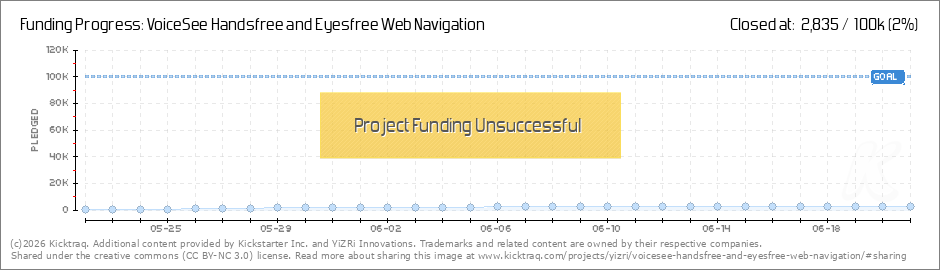
Funded: $2,835 of $100,000
Dates: May 22nd -> Jun 21st (30 days)
Project By: YiZRi Innovations
Backers: 50
Average Pledge Per Backer: $57
Funded: $2,835 of $100,000
Dates: May 22nd -> Jun 21st (30 days)
Project By: YiZRi Innovations
$2,835
current pledge level
Last Updated: June 21 @ 08:03 -0400 GMT
2%
of goal

(loading your very own snazzy kicktraq chart)
(loading your very own snazzy kicktraq chart)
(loading your very own snazzy kicktraq chart)
(loading your very own snazzy kicktraq chart)
(loading your very own snazzy kicktraq chart)
Now you can share!
Help your backers reach your daily goals and help others see how you're doing. It's easy, with Kicktraq Mini.Here are a few quick snippits of code you can use to embed your personalized widget on your website, in your blog, and even on your favorite forum.
HTML for websites & blogs
Copy HTMLBBCode for forums
Copy BBCodeReddit code for... well, Reddit
Copy Reddit CodeSpecial Note: Kickstarter recently disabled remote embedding for images on project pages, so embedding code doesn't work on project pages (yet) - just everywhere else.
You can read more about it here.
Latest News
USPTO patent has been granted! 
April 22nd - via: kickstarter.com
This post is for backers only. Please visit Kickstarter.com and log in to read. (Read More)
Headset Control Buttons Support
April 7th - via: kickstarter.com
In addition to delivering numerous bugfixes to increase stability and adapt to the latest versions of Android (plus better support for multiple Text-to-speech engines), we received this feature request from a VoiceSee™ user: "...the ability to... (Read More)
Shake to Speak!
October 15th - via: kickstarter.com
You can now interrupt Sadie's speech anytime* by also SHAKING your phone or tablet! To disable pause-by-shaking, say: "Disable Shake!" (or via Settings, if your hands are free) To re-enable pause-by-shaking, say: "Enable Shake!". When stopped, you... (Read More)
Introducing LMSIFY ("let me spell it for you") -- and much more...
September 2nd - via: kickstarter.com
You can now enter SPELL mode by saying: "Let me spell it for you!" (or just "Let me spell!"), then start dictating the letters by either saying their names (e.g. "ess" for s, "eff" for f) or saying their phonetic equivalents (see... (Read More)
This isn't the VoiceSee you downloaded on launch day
July 24th - via: kickstarter.com
Several key updates have been released in the past 11 days: Double-beep as eyes-free cue for "speak now!" Text-to-speech always US English (as long as you uncheck "Always use my settings"). Timeouts for Google servers taking too long to start... (Read More)
Skip Directly to Any Section of The New York Times
July 12th - via: kickstarter.com
Yet another round of updates on the way to optimal usability... Among them you can find: News Pal: Skip directly to any section or edition in the New York Times by saying its name (e.g. "Business!", "US Edition!" etc.). Wiki Pal: When prompted to... (Read More)
VoiceSee is now interruptable!
July 9th - via: kickstarter.com
This is a significant milestone in the evolution of VoiceSee on the way to optimal user experience: When reading news articles and Wikipedia overviews & sections, you can now interrupt Sadie's speech by either touching the Search button anytime... (Read More)
VoiceSee™ is getting Visual...
July 2nd - via: kickstarter.com
(Don't worry: VoiceSee is still totally hands-free and eyes-free. This visual phase is only a first step on the way to a better user experience for all.) The latest updates introduced a visual cue to when VoiceSee is ready to listen: Only speak when... (Read More)
VoiceSee™ Now Acknowledges "I heard you!"
June 28th - via: kickstarter.com
Another VoiceSee update has just been released: When you finish speaking, VoiceSee now acknowledges this with a double-beep. "Stop bugging me about Loquendo" button added to intro screen. You can also say: "Please stop bugging me!" "Get Loquendo TTS... (Read More)
VoiceSee™ is Now Touchable!
June 25th - via: kickstarter.com
An advanced version that allows users to use their hands to navigate a website from inside of Culinary Pal, News Pal and Wiki Pal has been released! What's new in this version: Scrolling a web page and opening links via touch are now enabled by... (Read More)
If you have additional news that doesn't appear here, shoot us a link!